OC PoliticalMP InterestsDonations AnalysisContract SearchNetwork ExplorerInvestigator NotebookPricingAll productsStart free trial →
Investigator Notebook

Case management for
serious investigations.

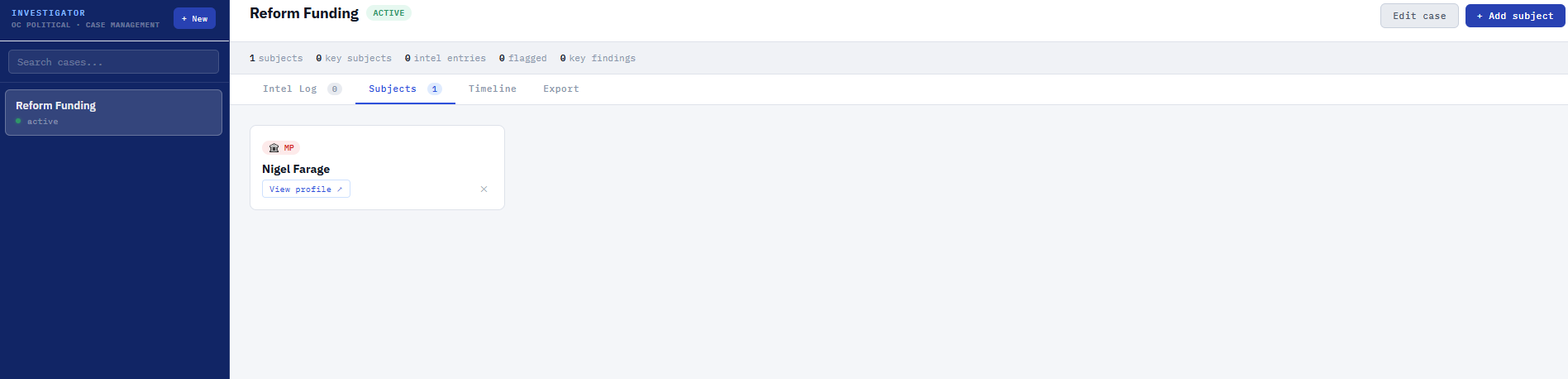
OC Political's Investigator Notebook turns a research tool into a full investigative workflow. Create named cases, add subjects from anywhere in the platform, log findings with timestamps and export structured reports — all in a private workspace that persists across sessions.

OC Political Investigator Notebook showing Reform Funding case with Active status — sidebar showing case list with search, main area showing Subjects tab with Nigel Farage added as an MP subject with View profile link, Intel Log, Timeline and Export tabs visible

From research tool to investigation platform.

OC Political gives you the data — MPs' interests, donations, contracts, company connections, land and charities. The Investigator Notebook gives you somewhere to build the case.

Create a named investigation — "Reform UK Funding" or "MP Interests: Infrastructure Sector" — and add subjects as you research. Log every finding as a timestamped intel entry. Flag the critical ones. View everything as a timeline. When you're ready, export the full investigation as a structured Markdown report.

Completely private. Your cases are never visible to other users, not shared with Open & Candid, and persist across browser sessions for as long as your account is active.

Feature type
Private Case Management
Cases, subjects and intel entries stored privately per account. Persists across sessions. Export to Markdown. Included in every OC Political subscription at no extra cost.
Named investigations
Create any number of cases with a name, brief and status (Active, Closed, Archived). Cases appear in the sidebar — searchable and switchable at any time.
Subjects
Add MPs, donors, companies, parties, people or other entities as subjects. Set significance (Key, Normal, Background) and add initial notes. Subjects link back to their OC Political profiles.
Intel Log
Log findings as timestamped entries with type tags: Note, Finding, Connection, Source or Action. Assign entries to specific subjects. Flag critical findings with a 🚩 marker.
Timeline view
All intel entries shown in chronological order — a complete record of the investigation as it developed. Flagged entries highlighted. Subject attribution shown for each entry.
Markdown export
Export the full investigation as a structured .md file — subjects, intel log, timeline view — with options to include only flagged entries or selected sections. Downloads instantly.
Add from anywhere
Any MP, donor or company profile in OC Political has a Notebook button — add that entity directly to an open case as a subject without leaving the profile you're viewing.

How an investigation works

01
Create a case
Name your investigation and add a brief — e.g. "Identify which Reform UK donors also hold government contracts." Status set to Active.
02
Add subjects
As you research — searching donations, MP profiles, companies — add relevant entities to your case using the Notebook button on each profile.
03
Log findings
Write Intel Log entries as you discover connections. Tag them (Finding, Connection, Source), assign to a subject, flag the critical ones. Ctrl+Enter to log quickly.
04
Export the report
When ready, export to Markdown — a structured report with all subjects, findings and timeline. Share with colleagues, archive for reference or publish.

Try OC Political
free for 14 days.

The Investigator Notebook is included in every OC Political subscription. Full access from day one — no credit card required.

Start free trial →

£39.99/month after trial · Cancel any time

Common questions

What is the Investigator Notebook?
The Investigator Notebook is a private case management tool built into OC Political. Create named investigations, add subjects (MPs, donors, companies, parties), log timestamped findings with type tags, view a chronological timeline and export a structured Markdown report. Cases persist across sessions and are completely private to your account.
Is the Notebook included in the standard OC Political subscription?
Yes. The Investigator Notebook is included in every OC Political subscription at £39.99/month — there is no add-on fee. It is also available during the 14-day free trial with full functionality.
Can I add subjects directly from MP or donor profiles?
Yes. Every MP profile, donor profile and company profile in OC Political has a Notebook button — clicking it opens a case picker so you can add that entity directly to an open investigation as a subject, without navigating away from the profile you are viewing.
What formats can I export to?
The Export tab generates a Markdown (.md) report that downloads to your device. Markdown is a widely supported plain-text format readable in any text editor, and renders in tools like Notion, Obsidian, GitHub and most note-taking apps. You can choose to include subjects, the full intel log, flagged entries only, and a timeline view in the export.
Is there a limit on how many cases or entries I can create?
No. You can create as many cases, subjects and intel entries as you need. There are no limits on the number of investigations, the number of subjects per case or the number of intel log entries.