OC PoliticalMP InterestsDonations AnalysisContract SearchNetwork ExplorerInvestigator NotebookPricingAll productsStart free trial →
Open & CandidOC Political › Network Explorer
Network Explorer

Map political connections.
Instantly.

Type any name — an MP, a donor, a company — and OC Political builds an interactive force graph connecting them to MPs, political parties, company donors, individual donors and government contracts. Relationships that take hours to research manually appear in seconds. Click any node to expand and keep following the connections outward.

Start free trial → ← Back to OC Political
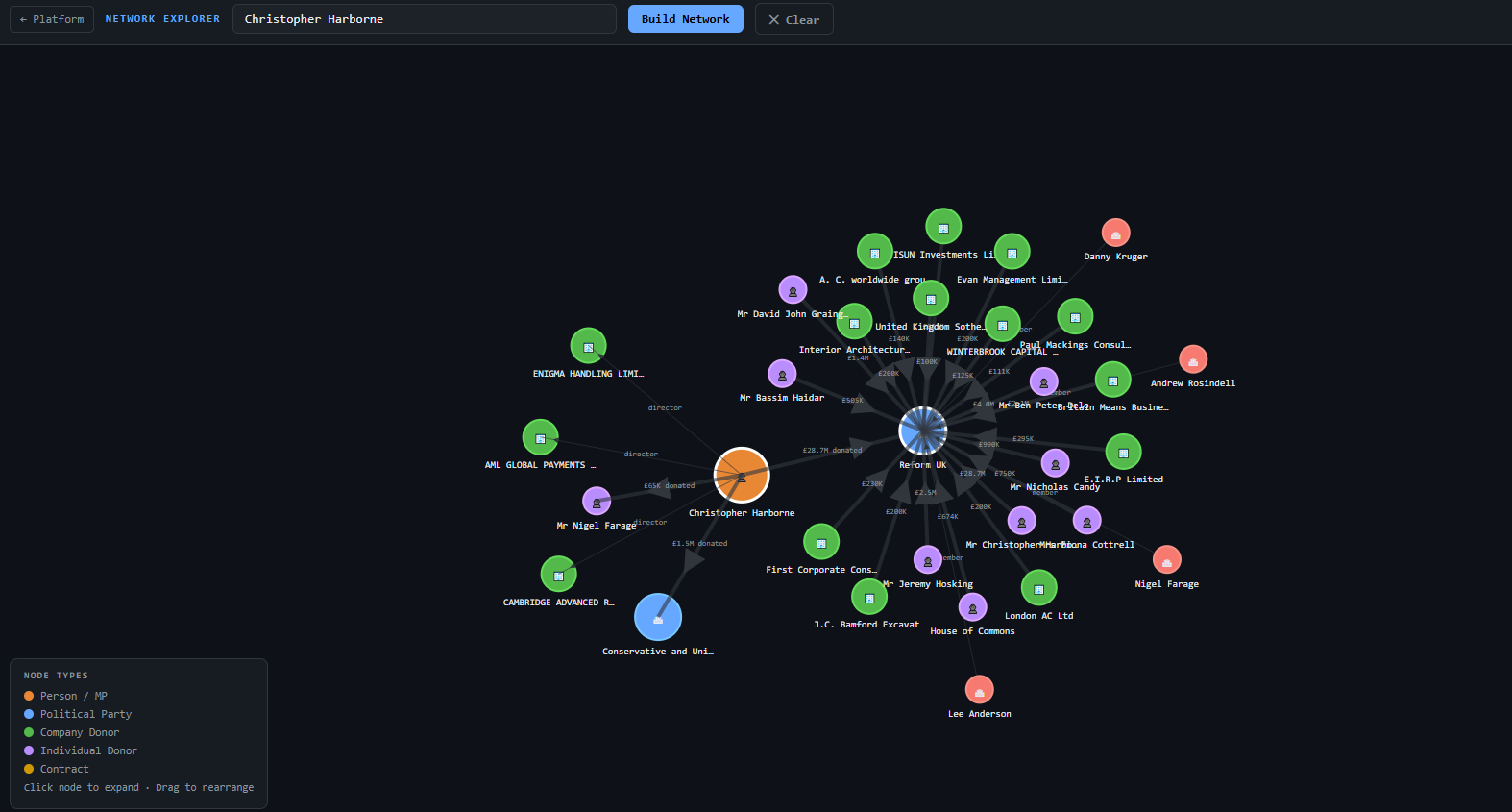
OC Political Network Explorer showing Christopher Harborne force graph — central node connected to Reform UK and Conservative Party via donation edges showing £28.7M and £1.5M, with multiple company and individual donor nodes including Nigel Farage, Danny Kruger and Lee Anderson

The connections that don't appear in any single register.

A donor connected to a company connected to an MP connected to a contract — that chain might span four separate government systems. Finding it manually means cross-referencing the Electoral Commission, Companies House, Parliament's website and procurement portals.

OC Political's Network Explorer builds that chain automatically as a visual graph. The Christopher Harborne example above took seconds — £28.7M donated to Reform UK, directorship connections to AML Global Payments, and Nigel Farage as a fellow director of Cambridge Advanced Research.

Data sources
Companies House · Electoral Commission · UK Parliament · Government Contracts
Cross-referenced in real time from four authoritative sources. Graph builds dynamically as you explore — no pre-set depth limit.

Force graph visualisation

Nodes represent people, companies, political parties and contracts. Edges show the relationship type — director, donor, MP, PSC — with values displayed on donation and contract edges.

Five node types

Person / MP (orange), Political Party (blue), Company Donor (green), Individual Donor (purple) and Contract (yellow). Colour-coded legend always visible.

Click to expand

Click any node to fetch its connections and expand the graph outward — follow the network as far as you need to go.

Drag to rearrange

Drag any node to reposition it. The force simulation keeps connected nodes close. Rearrange to focus on the most important relationships.

Cross-dataset connections

The graph draws from Companies House, the Electoral Commission, the MPs' Register of Interests and government contracts simultaneously — showing connections no single register reveals alone.

Save to Notebook

Add any person or company from the network to your Investigator Notebook case — building your investigation as you explore.

Try OC Political
free for 14 days.

Full access to every feature from day one. No credit card required. Cancel any time.

Start free trial →

Access immediately at ocintelligence.co.uk

Common questions

What data does the Network Explorer show?
The Network Explorer draws from four datasets simultaneously: Companies House (director and PSC relationships), the Electoral Commission register (donation relationships — who donated to whom and how much), the MPs' Register of Interests (declared company and donor interests) and government contracts (contract award relationships). Edges are labelled with relationship type and value where available.
How far can I explore the network?
There is no fixed limit. Each time you click a node, OC Political fetches that entity's connections and adds them to the graph. You can expand the network outward as many steps as you need — from a donor to their companies, to the MPs who declared interests in those companies, to the parties those MPs belong to.
Can I search for a company rather than a person?
Yes. Type any company name into the network search field and OC Political will build the graph from that company outward — showing its directors, PSC holders, donation connections and any MPs who have declared an interest in it.
Is the Network Explorer available on mobile?
The Network Explorer is a force graph designed for desktop use — it works best on a screen of 1200px or wider where you have space to expand and rearrange nodes. It is accessible on tablet but the full experience requires a desktop browser.